Pages

Showing posts with label support. Show all posts

Wednesday

Processor Scheduling

his tweak is impossible to explain without getting into the technical ins and outs of binary values, bit pairs and bit masks. Suffice it to say, it forces short, variable length processor timeslices to be allocated to foreground processes three times more often than those timeslices given to background processes.

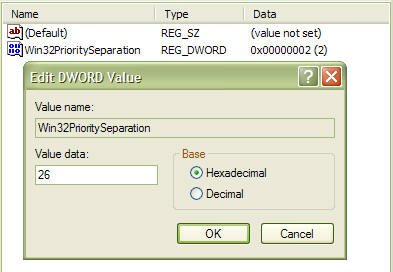
Start regedit and navigate to the following key:

[HKEY_LOCAL_MACHINE\SYSTEM\CurrentControlSet\Control\PriorityControl]

Change the value of Win32PrioritySeparation to 26 hexadecimal, which is 38 decimal, save the changes and reboot.

As with the cache tuning tweak (#4), this particular tweak should not be applied to a system that is running either SQL Server or Internet Information Server (IIS) unless you are certain that you want to slow down those background processes.
Disable Last Access Timestamp

Whenever XP reads a file, it stamps the file with the date and time that you accessed it. This feature has its place but is not required for normal use unless you rely on the date of last access for backup purposes, which is a rare requirement for most backups. Putting a timestamp on a file that has just been read means that a write access has to be made to disk, so every time a read is executed, a corresponding write is also executed.

To disable the last access timestamp behaviour, start a command prompt, enter the following command then reboot;

FSUTIL behavior set disablelastaccess 1

Those of us who read and write Her Majesty's English need to take note of the American spelling of the BEHAVIOR parameter. To turn timestamps back on, repeat the command but replace 1 with 0;

FSUTIL behavior set disablelastaccess 0
 

(c)2010 IT TWEAKS.Created by Nashim|WebsiteLeadtrance